


- US - English
- China - 简体中文
- India - English
- Japan - 日本語
- Malaysia - English
- Singapore - English
- Taiwan – 繁體中文

Storage performance and cost are commonly compared using $/TB, but the IO size of the workload has a first order effect on the amount of capacity required to deliver a given level of throughput.
Stop pricing storage like every IO is the same. When throughput matters, IO size becomes the real cost driver. Small, random IO crushes HDD throughput density because mechanical latency dominates—so you end up buying extra capacity just to hit your MB/s target.
In this two-part blog, I quantify how fast that penalty explodes on HDDs, then show why QLC SSDs like the Micron 6600 ION SSD with G9 QLC NAND are the right choice.
Impact of IO Size on Storage Performance
When comparing the cost of QLC to HDD for storage applications, the IO characteristics strongly determine the effective cost of delivering throughput. To understand this effect, we start by examining how throughput density varies with IO size for a typical HDD.
IO Size and Throughput Density
Throughput density, measured in (MB/s)/TB, provides a scale-independent measure of storage performance. A simple model combining the latency and transfer rate provides the behavior as a function of IO size. Real-world IO sizes are log-distributed (KiB → GiB), so IO size is expressed in log₂ terms.
(click image to enlarge)
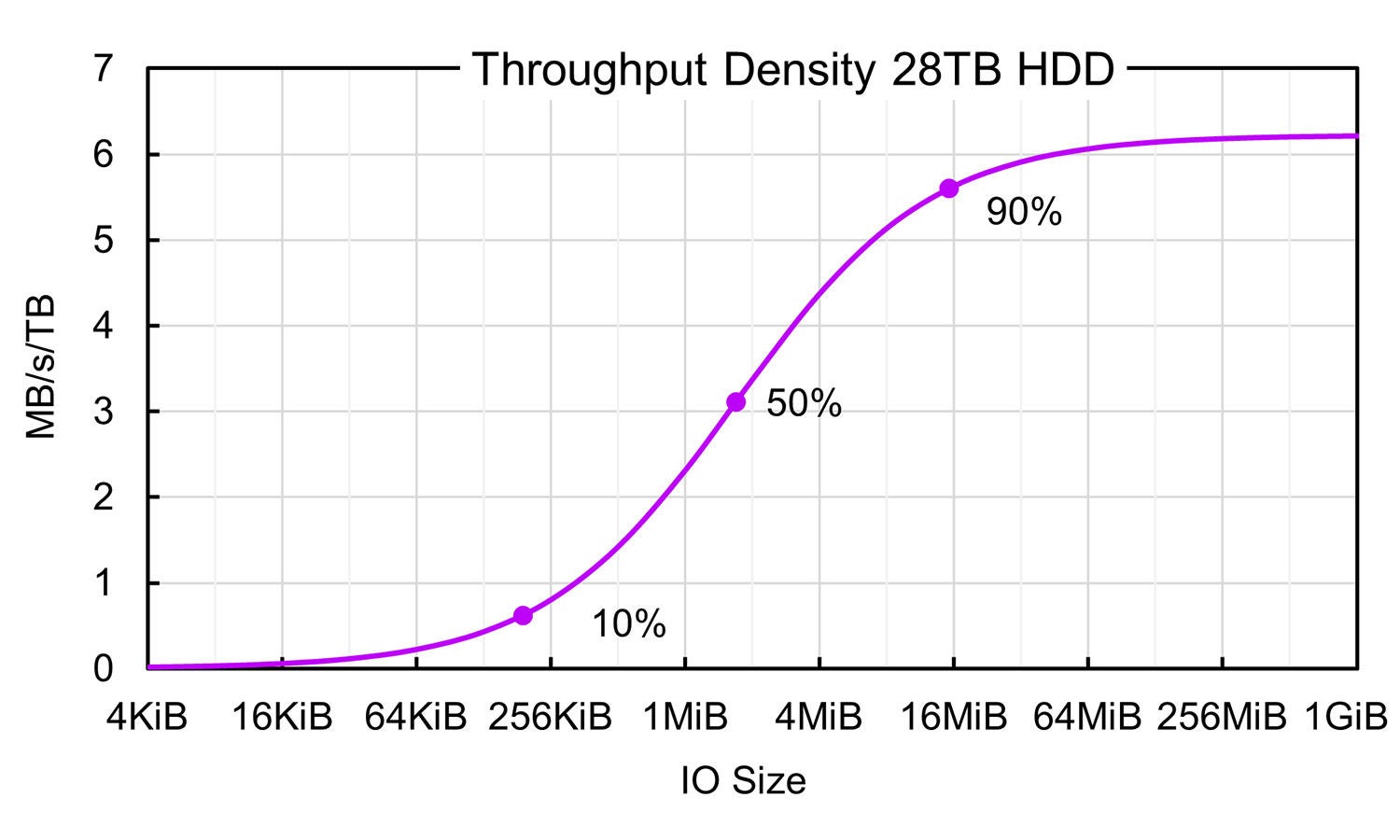
Figure 1. Throughput density curve for a typical 28TB HDD vs log2(IO size), assuming 100% random IO at each IO size.
Figure 1 shows the throughput density curve for a typical 28TB HDD. The curve is S-shaped, dominated by latency at small IO sizes and by transfer rate at large IO sizes. The midpoint is 1.8 MiB, and throughput drops quickly for small IO sizes. The curve can be modeled using:
A⋅I/(B+I)
where A = transfer rate, B = latency × transfer rate (midpoint), I = IO size.
Given this performance curve, the next step is to determine how much physical capacity is required to sustain the observed throughput.
Capacity Required for IO Throughput
A key cost driver is the capacity required to deliver a given level of throughput. This can be expressed as TB/(MB/s), the inverse of throughput density.
(click image to enlarge)
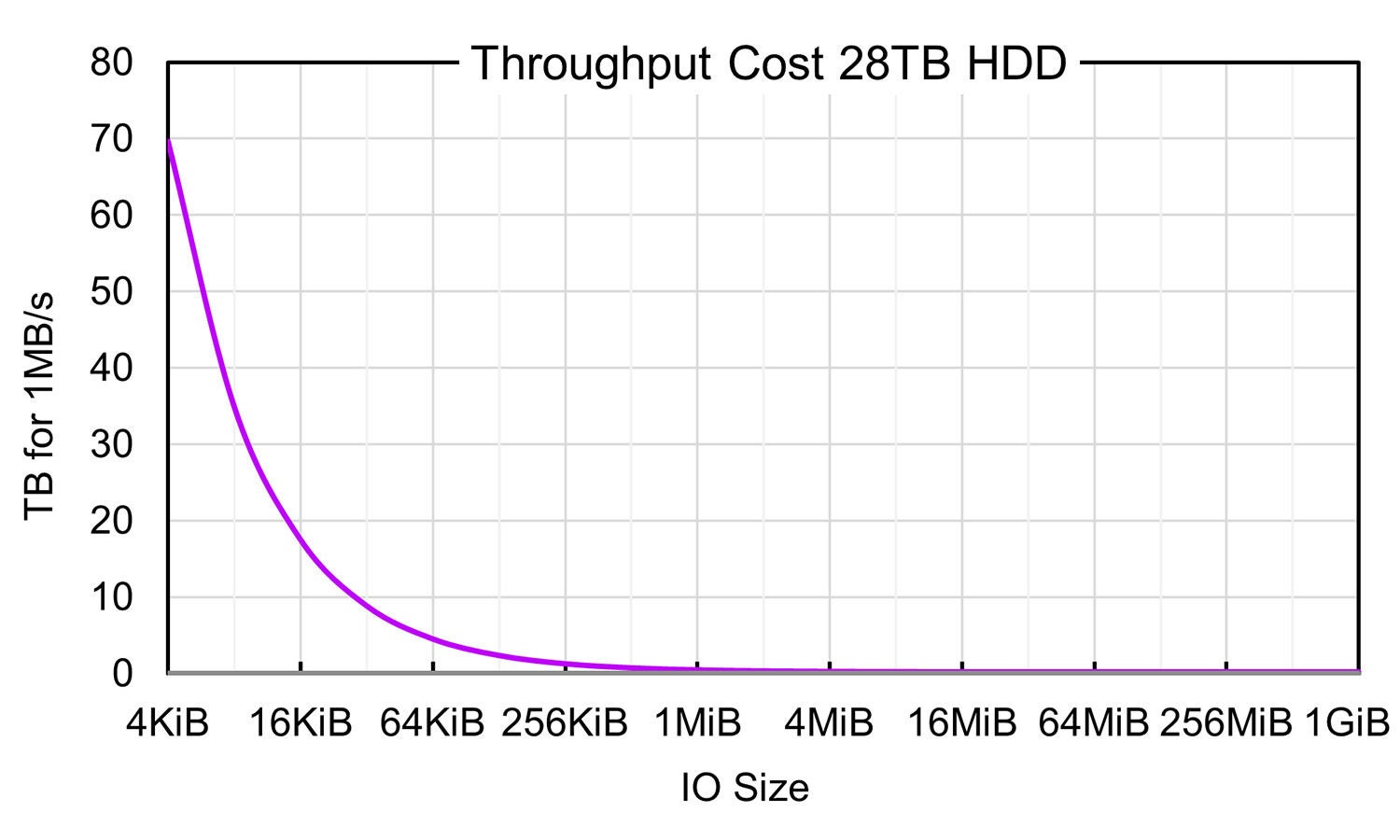
Figure 2. Cost of throughput for a 28TB HDD expressed as TB required to deliver 1MB/s of throughput as a function of IO size.
Figure 2 shows the cost to deliver 1MB/s of throughput vs. the IO size for a 28TB HDD. The functional form is 1/log(IO size), so costs increase rapidly at small IO sizes.
Figure 2 (28TB HDD) shows:
- At 1MiB IO, delivering 1MB/s requires 0.4TB (~1.5% of the drive).
- At 4KiB IO, the same throughput requires 70TB (~2.5 drives). Thus, a 4KiB IO costs 160× more capacity than a 1MiB IO.
This means a 4 KiB IO costs roughly 160 times more capacity than a 1 MiB IO on HDD.
The QLC SSD Performance Advantage
QLC SSDs do not suffer from mechanical latency, so their throughput density remains high even for small IO sizes.
(click image to enlarge)
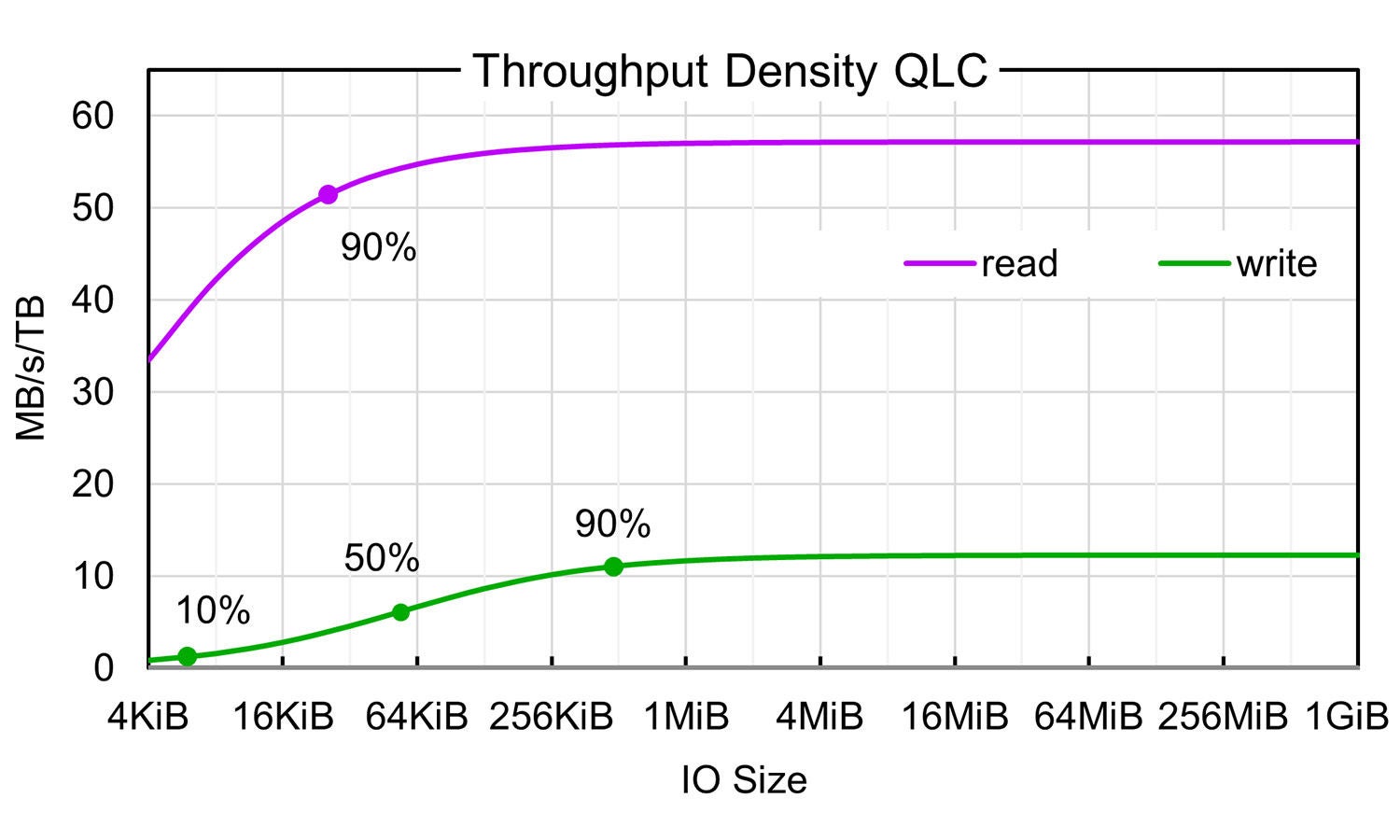
Figure 3. Read and Write throughput densities for a capacity-optimized QLC SSD.
Figure 3 shows the read and write throughput densities for a capacity optimized QLC SSD:
- Read throughput density remains high even for small IO sizes.
- Write throughput density is lower but still dramatically better than HDD.
- Example: 64KiB random writes on QLC achieve 6.7 MB/s/TB, which is faster than 256MiB IO on the HDD.
Capacity Cost for QLC Throughput
These performance differences translate directly into lower required capacity.
(click image to enlarge)
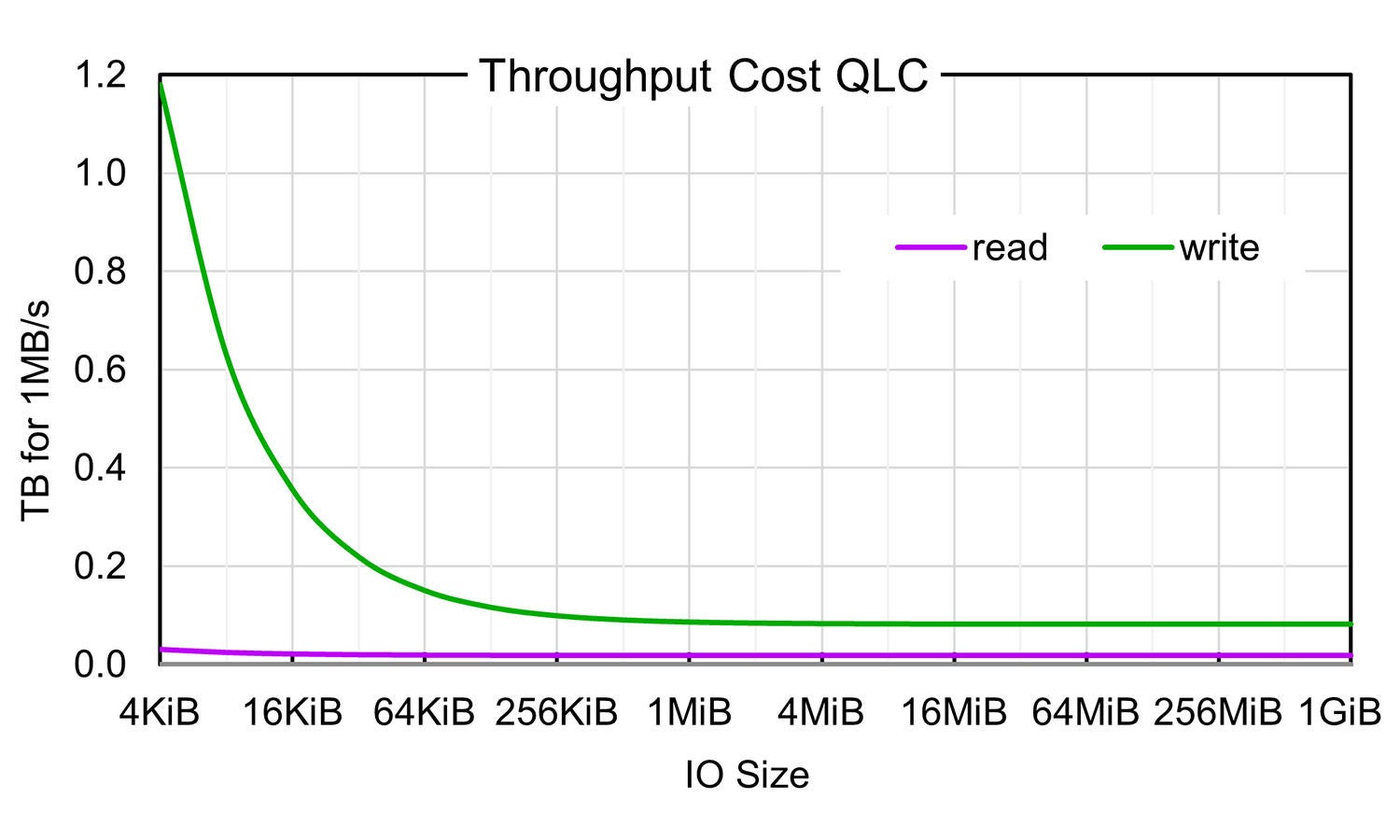
Figure 4. Cost of throughput for a capacity-optimized QLC SSD.
Figure 4 shows the TB (cost) required to deliver 1MB/s.
- Even at 4 KiB writes, QLC requires only ~1.2 TB, a reduction of about 60× relative to HDD.
- At 1 MiB IO with a 2:1 read/write ratio,
- QLC requires only ~0.041 TB
- HDD requires ~0.43 TB
Conclusion
Improved performance at small IO sizes can dramatically reduce the required capacity, thereby reducing the overall cost of QLC SSDs vs HDDs. Even at IO sizes of 1MiB, QLC needs 1/10 the capacity of HDD to deliver the same throughput. Evaluating storage cost purely on media $/TB obscures these effects. While realistic workloads have distributions of IO sizes, these effects can still have a significant impact.
Look for part two of this blog coming soon, where we will dive deeper into QLC based SSDs like the Micron 6600 ION SSD.